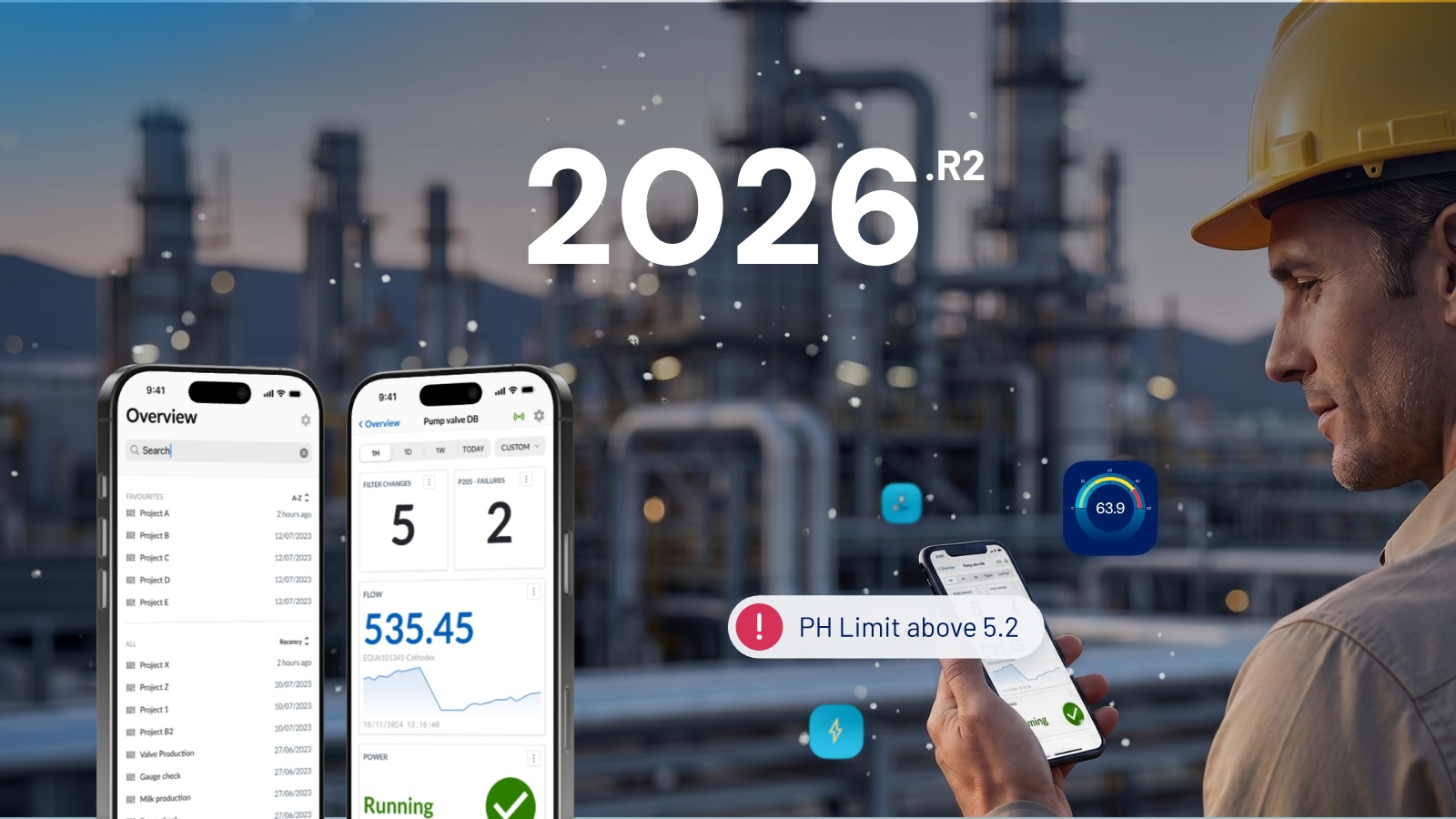

The 2026.R2 release of TrendMiner extends where process insights can reach and how they can be structured. Field teams and engineers can now access asset dashboards on their phones, providing insights from the field and on the go. Complex plant hierarchies can be modeled in calculated tags the way they actually exist, not squeezed into a two-level constraint. And for organizations investing in AI, a new MCP Server connects TrendMiner's time-series data and analytic tools to the AI clients your teams already use. Together with new connectivity and a wide set of application enhancements, 2026.R2 continues to adapt TrendMiner to your organization's established environment and way of working.
Mobile dashboards: process insights where the work happens
Industrial data is most useful when it reaches the person who needs it, at the moment they need it, in the place they are.
What's new? When you log in to TrendMiner on a mobile device, you are automatically taken to a mobile dashboard overview. From there you can browse, search, and open dashboards in a layout designed for smaller touch screens. Inside a dashboard, you can switch time frames, toggle live mode, refresh on demand, and inspect context items.
Mobile dashboards also include a QR code scanner. Place a QR code in a common area, piece of equipment, or a maintenance ticket, and any colleague with a TrendMiner account can open the corresponding dashboard by scanning it with their phone. The right data, on the right asset, in seconds.
Editing dashboards, tiles, and context items remains on desktop.
Why it matters: Field engineers, operators, and maintenance teams spend their shifts at equipment, not at desks, and often team members remain on-call off-hours. Mobile dashboards lower the threshold to consult process insights and make data accessible to colleagues who may have previously depended on others for it.
Calculated tag nesting: model your plant as it actually exists
Calculated tags are one of TrendMiner's most flexible tools for structuring process logic. In 2026.R2, they become considerably more powerful.
What's new? Calculated tags can now be nested up to 20 levels deep, a 10x increase from the previous limit of 2. This is among our most-requested improvements, and it was made possible by a full rework of TrendMiner's indexing layer.
With 20 levels available, you can structure calculations to reflect how your plant is actually organized:
- Compute KPIs at unit level, aggregate them at area level, then roll them up to plant level. Each step is its own calculated tag, reusable across views, monitors, and dashboards.
- Build calculations step by step and refine them as your analysis evolves, without having to plan the entire tag tree upfront or flatten logic into a single oversized formula.
A small but practical addition pairs well with deeper nesting: the tag dependency browser now includes an Edit button that takes you directly to the tag builder edit form. When you identify a tag you want to adjust, you no longer need to hunt for it in the Work Organizer first. With calculation trees getting deeper and more interconnected, that shortcut adds up.
Why it matters: The previous two-level limit forced users to flatten complex logic, work around the constraint, or abandon the use case entirely. This change brings TrendMiner's calculated tag logic in line with how real plants are organized and removes a structural limitation that had been in place since early versions of the platform.
MCP Server: TrendMiner analytics in your AI stack
For organizations already using AI assistants internally, connecting them to process data has typically required custom integration work. The new TrendMiner MCP Server changes that.
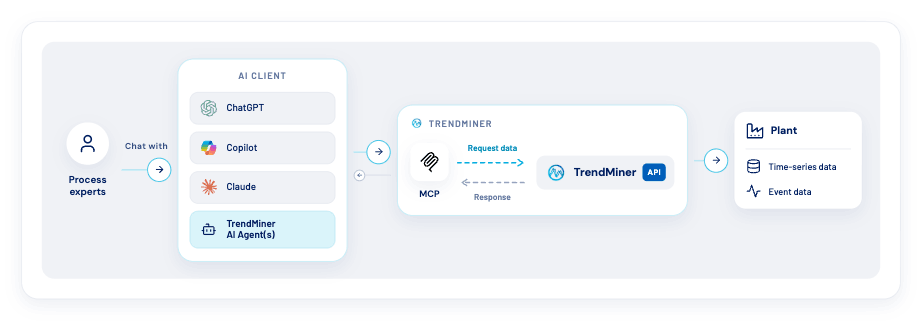
What's new? The TrendMiner MCP Server connects your process data and analytic tools to the AI clients your team already uses, including Microsoft Copilot, OpenAI ChatGPT, or Anthropic Claude. Process engineers and operators can ask questions in plain language and receive answers grounded in TrendMiner's time-series data and purpose-built analytical tools. No deep platform knowledge required.
MCP (Model Context Protocol) is a standard adopted by all major AI platforms. The TrendMiner MCP Server acts as a translation layer, describing the tools, data, and actions available so that any LLM agent can use them. This first release includes Discovery, Data and analysis, and Visualization tools. This toolset will expand with each future release. This is step one toward full TrendMiner AI Agent capabilities via MCP.
Why it matters: Most industrial organizations are already investing in enterprise AI. The MCP Server makes TrendMiner's time-series data and analytics a working part of that investment, without new hosting agreements, without changes to your approved IT environment, and without requiring your engineers to become TrendMiner experts before they can query their own process data.
Bonus: Plug-and-play connectivity to Proficy Cloud
TrendMiner now connects directly to Proficy Cloud via REST API. Once configured, your Proficy Cloud historian data is available in TrendMiner alongside your other data sources for combined analysis and monitoring.
For detailed information on the release please, please refer to the release notes.